The Blog Contains Information About Blogging. It has Blogger Widgets, templates and Much More About Blogging.
Showing posts with label Facebook. Show all posts

Sunday, 24 November 2013

Instant messaging service is at your finger tip for free!!! Now you can send SMS across globe to any mobile through your favorite social networking site, FACEBOOK. Till now we were using our mobiles to send sms, but now you can send through Facebook too using an application called "ChatSMS" which allows you to send free sms to any mobile across globe and that to FREE ! FREE !! FREE !!!


 An application in Facebook "ChatSMS" is one app that has text messaging trick to any country . To know how to send free sms from Facebook, follow the steps mentioned below:


Login to your Facebook account.
Type http://apps.facebook.com/chatsms/ in your browser and grant the permission for accessing the application.
In the displayed screen , you just have to type your country , the mobile number of the person whom you want to send the sms and the text to send. The only restriction of this application is you can only send 4 sms per day and 100 characters  is the limit of the text message. Other that these points, it works well for sending sms to any country , to any mobile, for free.

So how is this trick. I am sure you will definitely use this interesting app for your benefits.  
Posted by John Peter on 09:34 | No comments | Categories:
facebook ghost prank
Facebook is worlds popular social networking site.It is that success because most of them use Facebook for chatting with friends,sharing pictures,videos and some other information.And there are many Facebook tricks available to make use of Facebook effectively.Now here in this post i will let you a PRANK that makes your friends scary.


Note: Don't try this prank on Heart patients and kids.
Ghost Facebook Prank:

Just click here to go to GHOST PROFILE
As soon as click above link then you are directed to ghost profile
Just wait for few seconds then you will see that suddenly a ghost arises  from center of Facebook just like below
Now just copy the link and send to your friends

I used this tricks on my friends and many of friends are so scarred  especially girls are shouting when they watched this prank and scared a lot.
Posted by John Peter on 08:58 | No comments | Categories: ,

Saturday, 23 November 2013

Send Friend Requests On Facebook When You Are Blocked
Hi friends, it is needless to say that Facebook is an good Social media that keeps us to be in always contact with our Relatives, friends, and Family.  But Facebook is also  very strict with their policies, even though it is for connecting the people all over world, it do not encourage the spam or adding strangers. Everyone had faced this problem once in your life , as you friend requests are blocked and you cannot send the friend request.
The Facebook is using this rule to just secure the people from spam and Make them more comfortable, More over the Pending of larger Facebook requests are the major reason for your ban
Better to clear the Pending friend requests, Today I am going to tell you how you can send the friend request on Facebook even though you are Blocked.
Send Friend Requests On Facebook When You Are Blocked
How to Send friend requests when you are Blocked

1.
When you are trying to add an friend (if you are blocked), you must need to knw the Email address of the Person whom you are going to add. First of all go to this link.
There are two ways to get the Email id of the Person:
  • By his/her Profile
  • By any other ways
If their email may be hidden we need to use something else to get it. Go to Yahoo.com and login with Facebook. Once you have set it all up click Import Contacts from Facebook. Boom, you have almost everyone in your friend lists email address. Search for your inbox sender and copy his email address. Lets say John's email is John@john.com
2. When you want to add more friends, better to create a Contact file
3. The Easy way to Create a Contact file is:
  • Create an new text document in notepad
  • Pate/add the Email addresses separated by comma (,)
  • Save this file with the Extension .vcf
  • The saved file is your Contact File

4.
Now upload your contact file by going to this link , after opening this link there are so many options, at the bottom we can see Other Tools  Click the Other Tools and you will find the Option to Upload your File

5.
Finally click on "OK" when you are done with your work.
That's all , if you like this tutorial please don't forget to subscribe to my blog and get the regular updates


Posted by John Peter on 01:08 | No comments | Categories: ,

Monday, 18 November 2013

Permanently Stop Tagging on Facebook Timeline
I know you are tired of getting too much photo  and post tags on your Facebook timeline.No doubt Facebook is one of the best social networking site. It has more feature than any other social networking site and one of them is the feature that enables the users to tag their  friends in their posts and . It is a good feature only if it is used correctly. You should tag your friends only when you have to mention them in photos .It is so much annoying when someone tags you in irrelevant posts.Basic terminology of sharing and tagging according to Facebook, then read the below definitions.


Tagging: Tagging is the fastest way to share something on Facebook with multiple friends simultaneously. A user can share something with 45 friends simultaneously.
Sharing: Sharing something on Facebook is limited to a single person at one time. It concluded, A user will repeat the process again when he wants to share something with another friend. It does not give the option of multiple friends whenever to share something.

Permanently Stop Tagging on Facebook Timeline

Some Facebook experts already aware with this trick, how to disable or stop tagging on Facebook timeline, but i am dedicating this tutorial to those who are curiously want to know, how to stop Facebook unwanted tagging from your friends. follow the below given step by step guide how to completely stop tagging on Facebook timeline.
Go To Your Facebook Account and Click on Privacy option from the list.
Permanently Stop Tagging on Facebook Timeline

Click On Timeline and Tagging from The right Side layout options. Now Click on Edit option as you see in the below screenshot. Now Finally Click and Select Enabled Option


Permanently Stop Tagging on Facebook Timeline


After doing these customization, whenever a person tags you, tagged photos and posts will hooded for review.These posts will be visible on you timeline after approval. I wish this will help you. Also watch the video tutorial given below to understand better. Ask your questions by leaving your comments below.

Posted by John Peter on 03:41 | No comments | Categories:

Tuesday, 29 October 2013

By default, anyone can see your friends list on Facebook. Its very easy to hide your friends list on Facebook and make it private, so only you can see it.Ever-changing Facebook can be difficult to keep up with, especially when some options seem to move from place to place over time. In the case of hiding your friend list in 2013, you may be trying to find this option in your privacy settings or account settings, but you won’t have much luck. If you want to hide your friend list, you have to start at the list itself. We’ve provided the simple steps below:
Step 1: Visit Your Facebook Profile.
Step 2: Visit the friends list page of your profile.

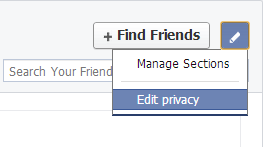
Step 3: Click on manage. then select edit privacy


Step 4: Change the friends list privacy settings to "only me"
DONE!!!
Watch the video tutorial given below to know more about hiding your friends list on your Facebook profile.

Posted by John Peter on 14:06 | No comments | Categories:
Facebook ID

Find Your Facebook ID


In this blog post, I'll tell you how to find your Facebook ID.For finding your Facebook ID, you must visit your Facebook profile page. After visiting your profile page, note down the URL and mak some changes in it.

For example, suppose URL of your profile is
"https://www.facebook.com/username"
now, replace the "www." with "graph." after replacing,the URL looks like
 "https://graph.facebook.com/username".
Now hit enter and you will see your Facebook ID as shown in the screenshot.

Video tutorial given below will help you to understand better.

Posted by John Peter on 08:40 | No comments | Categories:

Sunday, 27 October 2013

Autopoke YOur Friends on Facebook
Now its time to poke your friends. Now you can automatically poke back your friends with this simple trick.Why do people Poke someone on Facebook? Is there a specific reason for poking someone? One of my blog reader asked me these questions and I did my research.The poking feature has no set meaning, it was made to be used in any way you like. Different people use it differently and this even differs from person to person. You can poke someone you have not talked with for sometime, just to show them that they are still not forgotten. You can poke your loved ones to tell them you miss them. And people do poke their friends just to disturb them. Some people even poke others to get their attention and to make them start a conversation. Different people interpret poking differently and react accordingly. So exercise caution. Share with your friends on facebook.
 

How To Auto Poke Your Facebook Friends

Getting many pokes can become irritating, and poking back all of them can worsen the situation furthermore. What if there was a way to auto poke people who poke you? Yes, you guessed it right, there is.
Facebook Autopoke is a script that automatically pokes back anyone who pokes you, but they need to be listed at your home page. The script runs on all major browsers and is successfully tested on Chrome, Opera and Mozilla Firefox by the developer. You will need to have additional extension(s) to make it work though.

Installing Facebook Autopoke

You need different extensions to make it work on different browsers. See below for your browser.
For Chrome
First install the Tampermonkey extension from Chrome Store and then install the Facebook Autopoke script from userscripts.org.
For Firefox
First install the Greasemonkey extension and then install the Facebook Autopoke script.
For Opera
For Opera, you need to have one extra extension. First install the Download Chrome Extension, then the Tampermonkey extension and then you can install the Facebook Autopoke script
LINK: Facebook Autopoke
Posted by John Peter on 06:16 | No comments | Categories:

Wednesday, 16 October 2013

facebook social pluginHere I’m posting a detailed tutorial on adding a Facebook social plugin in blogger blog.Follow the easy steps given below to add the Facebook social plugins.
Visit Facebook developers page to chose your plugin, There are several plugins you can chose from the list and of Course you can add all of them at a time. In this tutorial I’m going to chose the “Facebook like box” but you can chose any one of it. You have to follow the same steps for all the plugins. You can find these plugins anywhere.Facebook social plugins are widely used online today. The most famous is the "like" button which is used by millions of webmasters to promote their sites. How many of these social plugins do you use on your blog? I'll try to provide brief information about these great tools that might help you to achieve your online endeavors.


Like Button

The Like button lets anyone share pages from your site back to their Facebook profile with one click.
 
Send Button
 
The Send button allows people to easily and privately send content to their friends.
 
Embedded Posts
 
Embedded Posts let you add any public post from Facebook to your blog or web site.
 
Follow Button
 
The Follow button lets other people follow a person's public updates on Facebook.
 
Comments
 
The Comments plugin lets people comment on any piece of content on your site.
 
Share
 
The Share Dialog lets users add a comment and customize the title and thumbnail of the link they share.
 
Activity Feed
 
The Activity Feed plugin shows users what their friends are doing on your site through likes and comments.
 
Recommendations
 
The Recommendations plugin gives users personalized suggestions for pages on your site they might like.
 
Recommendations Bar
 
The Recommendations Bar allows users to like content, get recommendations, and share what they’re reading with their friends.
 
Like Box for Pages
 
The Like Box enables users to like your Facebook Page and view its stream directly from your website.
 
Registration
 
The registration plugin allows users to easily sign up for your website with their Facebook account.
 
Facepile
The Facepile plugin displays the Facebook profile pictures of users who have liked your page or have signed up for your site
facebook social plugin
Enter your Facebook page url and click on get code.
image
Paste Both the codes in notepad to add them into your blog layout.facebook social plugin
Now the final step, Go into your blog layout and click on add html/java script.image
Now Paste both the plugin codes inside it and click on save.

That's it!! visit your blog to see if it is working or not. If You are still getting confused then watch the video tutorial.
Posted by John Peter on 12:45 | 1 comment | Categories: ,

Thursday, 10 October 2013

upside down text
fliptext.org is a free tool to write upside down text.There are many web applications to do that. Two of the best ones are Flip Text and Upside Down Text. After flipping the text you can use it on blogger, wordpress, facebook, myspace and many more. You need to type or paste the text into the first box, and the other box will give you the upside down text side by side. Then copy the inverted text and post it on Facebook, Twitter or any other social media website.Both flip text and upside down text works well. you can use any one of them.


Upside down text facebook
That’s it. Now, update flipped statuses on Facebook and shock your friends.
LINK: Flip Text / Upside Down Text
Posted by John Peter on 03:17 | No comments | Categories:
Facebook ChatToday I'm going to share with my all time favorite Facebook trick. Its the colorful chat codes in Facebook chat. The only bad thing with this codes is that it only works in Facebook chat.
We all chat on Facebook with our friends. But don’t you find that chat some what boring with the same default color all the time. So to generate some fun we are giving you some codes, with which you can write with colors in Facebook chat . The codes are not at all difficult to implement, you just need to copy a particular code for every alphabet to your chat window and it’s done.
The above photo is made using the same color codes. Paste this codes in the chat box to generate colorful alphabets. Don't forget to shre this codes with your friends. Happy facebooking :)

[[107015582669715]] = A

[[116067591741123]] = B

[[115602405121532]] = C

[[112542438763744]] = D

[[115430438474268]] = E

[[109225112442557]] = F

[[111532845537326]] = G

[[111356865552629]] = H

[[109294689102123]] = I

[[126362660720793]] = J

[[116651741681944]] = K

[[115807951764667]] = L

[[106596672714242]] = M

[[108634132504932]] = N

[[116564658357124]] = O

[[111669128857397]] = P

[[107061805996548]] = Q

[[106699962703083]] = R

[[115927268419031]] = S

[[112669162092780]] = T

[[108983579135532]] = U

[[107023745999320]] = V

[[106678406038354]] = W

[[116740548336581]] = X

[[112416755444217]] = Y

[[165724910215]] = Z

Posted by John Peter on 02:57 | No comments | Categories:
Make Rage Faces In Facebook ChatMany tutorial for Facebook chat like Colorful symbols , Awesome smileys , Facebook Like Button , and many more have been provided earlier. Now we bring some rage faces to be used in Facebook. Just copy-paste the code and you will get the face of your choice in your Facebook chat. Also see our Facebook Guide for all the Facebook tips you will ever need.
Note Remember to copy the square brackets along with the code.


Mother of God:   [[142670085793927]]
Cereal Guy: [[170815706323196]]
LOL Face: [[168456309878025]]
NO Guy: [[167359756658519]]
Troll face: [[171108522930776]]
ARE YOU KIDDING ME: [[143220739082110]]
Not bad Obama: [[169919399735055]]
Me Gusta: [[211782832186415]]
Yao Ming: [[218595638164996]]
Derp: [[224812970902314]]
Derpina: [[192644604154319]]
Forever Alone: [[177903015598419]]
Not Bad: [[NotBaad]]
Fuck yeah: [[105387672833401]]
Challenge accepted: [[100002727365206]]
Okay face: [[100002752520227]]
Dumb bitch: [[218595638164996]]
Poker face: [[129627277060203]]
Okay face: [[224812970902314]]
Socially awkward penguin: [[98438140742]]
Rage face: [[FUUUOFFICIAL]]
Lamp: [[100001256102462]]
No: [[167359756658519]]
MOG: [[142670085793927]]
Feel like a sir: [[168040846586189]]
Forever alone christmas: [[125038607580286]]
Posted by John Peter on 02:52 | No comments | Categories:
Powered by Blogger.

Bookmark Us

Delicious Digg Facebook Favorites More Stumbleupon Twitter

Text Widget

Sample Text

Download